Master Your 2026 Workflow with This Undated Canva Planner
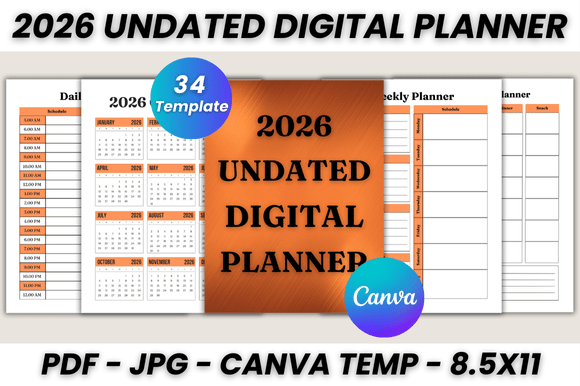
There is a specific kind of relief that comes with a well-organized plan. For professionals, creators, and anyone managing a busy life, the right organizational tool is not just about tracking dates; it is about creating a mental space where clarity can thrive. The 2026 Undated Digital Planner Canva Template is designed to be that space. It is a comprehensive system built within Canva, offering 34 printable pages that move beyond simple scheduling to become a central hub for your projects, meals, goals, and notes.
This planner is undated for a reason. It respects the reality that productivity does not always begin on January 1st. You can start using it in March, July, or November without wasted pages. Its visual design leans towards clean minimalism, utilizing ample white space and a neutral color palette that serves as a quiet backdrop for your plans. This approach is intentional. The planner’s personality is one of calm efficiency, avoiding visual noise so that your content—the actual plans and tasks—remains the clear focus. The overall appeal is professional yet approachable, making it suitable for a corporate setting, a creative studio, or a home office.
A Closer Look at the 34-Page System
Understanding the full scope of what you receive helps you leverage this tool effectively. The template is more than a collection of calendars; it is a structured yet flexible framework. Key components include a Belongs To page for personalization, a full 2026 Calendar for the yearly view, and a Monthly Planner for each month from January to December. For day-to-day and week-to-week management, dedicated Daily and Weekly Planner pages provide the granularity needed to manage time blocks and priorities.
Beyond standard scheduling, the inclusion of a Weekly Meal Planner acknowledges the integration of personal and professional life. A robust To-do List page and two Notes pages offer flexible space for brainstorming, meeting notes, or tracking project milestones. The final Thank You page is a thoughtful touch, reinforcing a sense of completion and gratitude. Each page is a fully editable Canva file, meaning the fonts, sizes, colors, and layout elements are not locked. You can adapt the entire system to match your personal brand or preferred aesthetic.
Practical Applications Across Professions
The true value of a tool like the 2026 Undated Digital Planner Canva template lies in its adaptability to different workflows. For a content creator or blogger, the monthly pages can map out editorial calendars, while the weekly and daily pages detail shooting schedules, writing blocks, and publishing deadlines. The to-do list becomes a content pipeline tracker.
An entrepreneur or small business owner can use the monthly views for high-level goal setting and revenue targets, shifting to the weekly planner for client meetings, project sprints, and administrative tasks. The meal planner is equally useful for planning team lunches or managing a tight personal schedule during busy periods. For designers and marketers, the template acts as a project management asset. The notes pages are perfect for sketching campaign ideas or recording client feedback, keeping everything within one cohesive digital document.
Editing and Customization: Making It Your Own
Accessibility is a key strength of this product. To edit, you need only a free Canva account. The process is straightforward: after purchase, you receive a PDF with a link to the Canva template. Opening it creates a copy in your Canva account, leaving the original template intact. From there, the customization is extensive. You can change every element to align with your brand identity.
Consider the typography. The default fonts are chosen for readability, but you can swap them for fonts that match your logo design or other design assets. If your brand uses a specific sans serif font for headings and a serif font for body text, you can apply that pairing throughout the planner. This transforms it from a generic tool into a seamless part of your visual hierarchy. The color scheme can be adjusted to your brand’s primary and secondary colors, ensuring consistency across all your materials, whether digital or printed.
From Digital File to Physical Print
While designed as a digital planner, its utility extends powerfully into the physical realm. The files are optimized for US Letter size (8.5 x 11 inches), but Canva’s resize feature allows you to adjust it to A4, A5, or any other dimension. This flexibility is crucial. You can print the entire planner as a bound book, use a three-ring binder for easy page swapping, or print individual pages as needed.
The included BONUS JPG files offer another layer of convenience. These image files of each page can be used directly in digital note-taking apps like GoodNotes or Notability, or inserted into other documents. For a business, printing a customized monthly overview to hang in a common area becomes a simple task. The planner’s design ensures that printed pages look crisp and professional, with clean lines and ample margins that prevent content from getting lost in the binding.
Choosing and Integrating Your Planner
When evaluating this Canva template, think about your specific needs. Does the balance between monthly overview and daily detail match your planning style? The undated format is ideal for those who need flexibility, but it requires the discipline to fill in the dates yourself—a small task that reinforces intentional planning.
Test the font pairing and layout in Canva before committing to a print run. See how your own content sits within the designated spaces. Does your handwriting fit the notes sections? Is the to-do list ample for your typical task load? This hands-on evaluation is part of the process. The template is a design asset, and like any asset, its effectiveness depends on how well it integrates into your existing system. Use it as a foundation to build a planning ritual that is uniquely yours, supporting both the grand visions and the daily details of your work and life.