Design Custom Camera Wraps: A Canva Template Guide
The resurgence of disposable cameras at weddings, parties, and corporate events has created a unique branding opportunity. A Disposable Camera Wrap Canva Template is more than just a piece of paper; it is a cohesive design asset that transforms a generic plastic shell into a personalized keepsake. This template approach allows hosts and brands to apply consistent brand identity directly onto the camera body, turning a simple utility item into a curated part of the event's aesthetic.
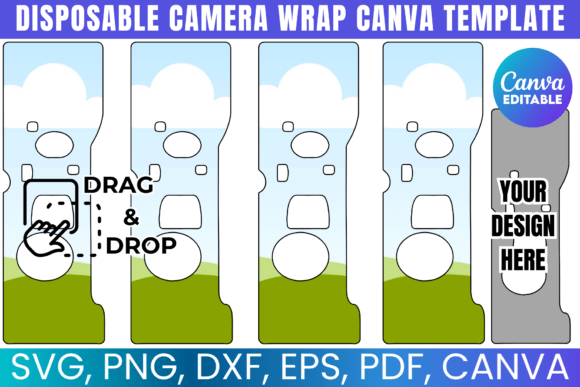
Visually, a high-quality camera wrap template balances structure with creativity. It typically features a layout that accommodates the camera's viewfinder, flash, and film door while offering ample space for custom graphics, monograms, or event details. The style often leans towards modern typography, utilizing clean sans serif font pairings for legibility against busy backgrounds, or elegant script font styles for formal occasions like weddings. The "personality" of the design relies heavily on the user's input, but the foundation is built for versatility—ensuring the wrap looks intentional rather than like an afterthought.
Practical Applications and Project Fit
Understanding where this design asset fits into your workflow is key to maximizing its value. For event planners and marketers, the Disposable Camera Wrap Canva Template is a powerful tool for packaging design. Instead of placing a generic camera on tables, you create a cohesive visual experience that matches invitations, menus, and signage. This level of detail elevates brand perception, signaling to guests or clients that every touchpoint has been considered.
For small business owners, particularly in the creative or service industries, these wraps serve as a subtle marketing tool. Imagine a boutique photography studio sending clients home with a branded camera after a shoot, or a travel blogger using custom-wrapped cameras as merchandise. The template allows for the integration of logos and taglines without overwhelming the physical object. It is equally effective for personal projects, such as creating a custom camera for a bachelorette party or a family reunion, where the camera itself becomes a memento.
Evaluating the Design Assets
When working with a Disposable Camera Wrap Canva Template, you are not just dealing with a single file type. A robust template package includes multiple formats to ensure compatibility across different production methods. The inclusion of SVG and DXF files is crucial for those using cutting machines like Cricut or Silhouette. These vector formats allow for precision cutting, ensuring the wrap fits the camera's contours perfectly without jagged edges. The PNG file, often with a transparent background, is essential for web design mockups or social media graphics where you want to showcase the product before printing.
The Canva link component is particularly valuable for users who prioritize speed and accessibility over complex software. It democratizes the design process, allowing those without Adobe Photoshop expertise to drag-and-drop elements, change color palettes, and modify text. This accessibility ensures that the visual hierarchy of the wrap—placing the most important information at eye level—is easy to achieve even for novice designers.
Integrating Typography and Visual Hierarchy
The success of a camera wrap lies in its readability. Because the surface area of a disposable camera is relatively small and interrupted by functional components, font choice is critical. A premium font with high legibility at small sizes is recommended. While a bold display font might look impressive on a computer screen, it can become illegible when printed on a curved, textured plastic surface. It is often wiser to use a clean serif font or modern typography styles for essential details like dates or hashtags.
Consider the font pairing carefully. If the event has a specific theme, such as a rustic wedding or a sleek corporate launch, the typography on the camera should reflect that. A handwritten font might suit a whimsical party but could clash with a formal black-tie event. Testing the design by printing a draft on standard paper is a practical step often overlooked. Wrap the paper around the camera to check how the text curves and how the colors interact with the black or white plastic casing.
Commercial Use and Brand Consistency
For those looking to sell these wraps or use them in a commercial capacity, understanding the usage terms is vital. Most templates of this nature allow for the creation of physical products for personal use or small business branding. However, reselling the digital template file itself is typically prohibited. Using the template to create a consistent brand identity for a client's event is generally permissible and encouraged.
The ability to resize templates ensures that the design assets can be adapted for different camera models or even other products like matchboxes or favor boxes, maintaining a consistent aesthetic across all packaging design elements. This flexibility is a hallmark of a good creative font and template system, allowing for a unified look across editorial design and physical merchandise.
Finalizing Your Camera Label Design
Once the design is finalized in Canva or your preferred software, the focus shifts to production. The print-ready PDF file is your go-to for standard home or office printing, offering a solid white background that ensures colors pop. For those using vinyl cutters, the SVG and DXF files provide the necessary data for intricate cuts, allowing for wraps that use negative space creatively.
Ultimately, a Disposable Camera Wrap Canva Template is a versatile tool that bridges the gap between digital design and physical product. It allows for the application of high-level design principles—visual hierarchy, color theory, and typography—onto a nostalgic medium. Whether you are a marketer looking to enhance a product launch or a crafter personalizing a gift, these templates provide a professional foundation for logo design application and brand identity extension.