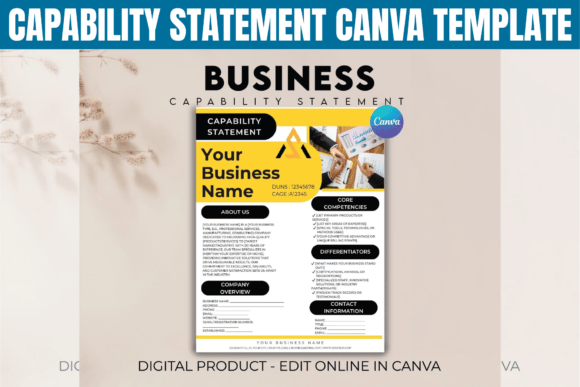
Capability Statement Canva Template: Your Business on One Page
More Than Just a Document
You’ve seen them before: the generic, text-heavy capability statements that look like they were pulled from a 2005 Word document. They do the job, barely, but they don’t do you any favors. A Capability Statement Canva Template flips that script. It’s a pre-designed, visually cohesive layout built in Canva that transforms your business credentials from a dry report into a compelling marketing asset. Think of it as your professional profile, corporate flyer, and first impression, all rolled into a single, polished package.
The visual personality of a well-designed template is confident, clean, and modern. It uses strategic white space, clear typographic hierarchy, and a balanced grid to guide the reader’s eye. You’ll often find a restrained color palette—perhaps a deep navy paired with a crisp white and a single accent color—that conveys professionalism without shouting. The style isn’t about flashy design trends; it’s about clarity and credibility. The overall appeal is one of organized competence, making it instantly suitable for contractors, consultants, and B2B companies who need to look established and trustworthy from the first glance.
Where This Template Shines: Real-World Applications
The true strength of a Capability Statement Canva Template lies in its versatility. It’s a core piece of your brand identity toolkit, designed for specific, high-stakes scenarios where clarity and professionalism are non-negotiable.
- Government Bids & Proposals: These often have strict formatting expectations. A structured, easy-to-scan template helps you meet those requirements while standing out for its clean presentation.
- Networking & Trade Shows: When you hand someone a one-sheet or a digital PDF, you want them to remember you. A cohesive design that pairs your capability statement with a matching corporate flyer creates a memorable, professional packet.
- Client Pitches & Onboarding: Quickly introduce your services, past projects, and team qualifications in a format that respects the client’s time. It’s far more engaging than a plain email attachment.
- Digital Portfolios & Websites: Export key sections as graphics for your website or use the full document as a downloadable PDF to establish authority.
It’s not just for print. The digital-first nature of Canva means your statement is optimized for screens, ensuring readability whether it’s viewed on a laptop during a video call or on a phone at an event. This adaptability across print design and digital platforms is a huge practical advantage.
Design Decisions That Build Credibility
A template’s effectiveness isn’t just in its aesthetics; it’s in how it influences perception and function. The layout of a Capability Statement Canva Template is engineered for impact.
Visual Hierarchy & Readability: The use of a strong, clear sans serif font for headings and a highly legible serif or sans serif for body text is a classic, effective pairing. This isn’t about choosing a creative font for its own sake; it’s about ensuring information is absorbed effortlessly. The hierarchy—company name at the top, core services highlighted, past projects listed clearly—tells a story without confusion. This directly influences how quickly a potential client or partner can grasp your value proposition.
Brand Perception & Consistency: Using a cohesive system that includes a marketing business template, matching flyer, and even professional invoice templates does more than look good. It builds recognition. Every touchpoint reinforces the same visual language, which is fundamental to strong brand identity. It signals that you pay attention to details, a quality clients look for in service providers.
Practical Customization: The real power is in the editability. You’re not locked into a static design. You can swap the serif font for a more modern sans serif font to change the tone, adjust the color palette to match your existing brand guidelines, or restructure sections to emphasize what matters most to your audience. This flexibility makes it a versatile design asset, not a one-off document.
Integrating It Into Your Workflow
Treat this template as a starting point, not a finished product. Before you dive into editing, gather your content: your mission statement, a concise list of core services, 3-5 standout past projects with brief results, and key differentiators. Having this ready makes customization efficient.
When you open the template in Canva, focus on these elements first:
- Typography: Check the font pairing. Does the heading font reflect your brand’s personality—authoritative, innovative, friendly? Ensure the body text is highly readable at small sizes, especially for contact information.
- Color & Imagery: Replace placeholder colors with your brand’s primary and secondary palette. Add your logo and, if possible, a professional headshot or a high-quality image of your work in action. This personalizes the document and builds trust.
- Content Flow: Review the sections. The standard flow—Overview, Services, Past Projects, Team, Contact—is logical for most, but you might reorder to lead with your strongest differentiator for your specific audience.
- Export & Test: Always export a high-quality PDF for printing and a separate, optimized version for digital sharing. Send the digital version to a colleague on different devices to check readability and link functionality.
Remember, the goal is clarity, not decoration. Every element should serve the purpose of making your business easier to understand and remember. A well-executed Capability Statement Canva Template